


Quick answer: To humanize AI text, cut the hedging and filler, vary your sentence lengths, add specifics a model could not know (names, numbers, dates, prices), write one line of real opinion, and read the result aloud. Most drafts need 10 to 15 minutes of this. A free AI text humanizer handles the mechanical parts, but the specifics and the opinion have to come from you.
AI drafts are fast, and they nearly all sound the same. Flat rhythm, careful hedging, no detail that could only have come from a person who was actually there. Readers notice before they can explain why, and so do editors and teachers.
This guide covers what makes AI writing recognisable, nine fixes in the order worth applying them, a worked before-and-after example, and an honest answer about AI detectors. Everything here works whether you edit by hand or start with a tool.
What does it mean to humanize AI text?
Humanizing AI text means editing a machine-generated draft so it reads like something a person wrote: varied sentence rhythm, concrete detail, a consistent voice, and a point of view. It is an editing job, not a formatting job. Running text through a rewriter changes the words; humanizing it changes what the text actually contains.
That distinction matters because most of what makes writing feel human is information, not phrasing. A sentence with a real price in it reads as human because a model writing from a generic prompt had no way to know that price.
Why does AI writing sound robotic?
Language models predict the most likely next word, so they drift toward the most average phrasing available. Microsoft’s own guidance on the problem describes AI text as marked by redundant words and phrases, neutral tone, and vague language, and recommends varying sentence structure and tightening vocabulary as the first fixes.
In practice, seven tells do most of the damage.
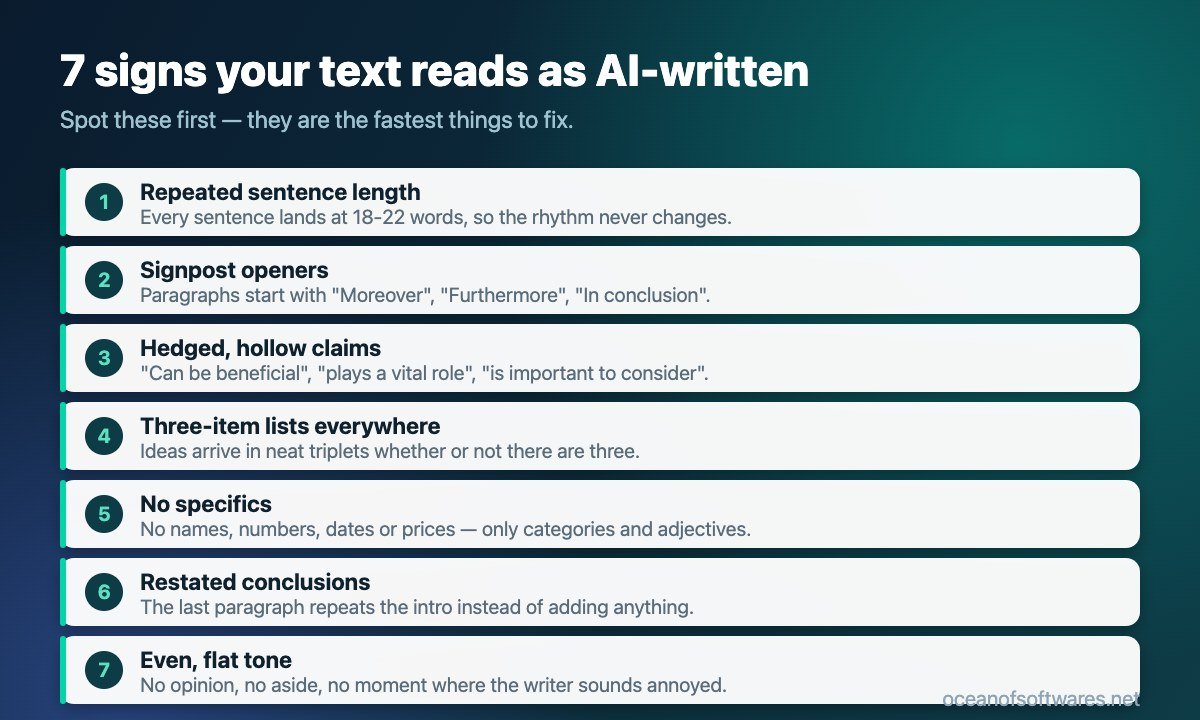
How to humanize AI text: 9 fixes
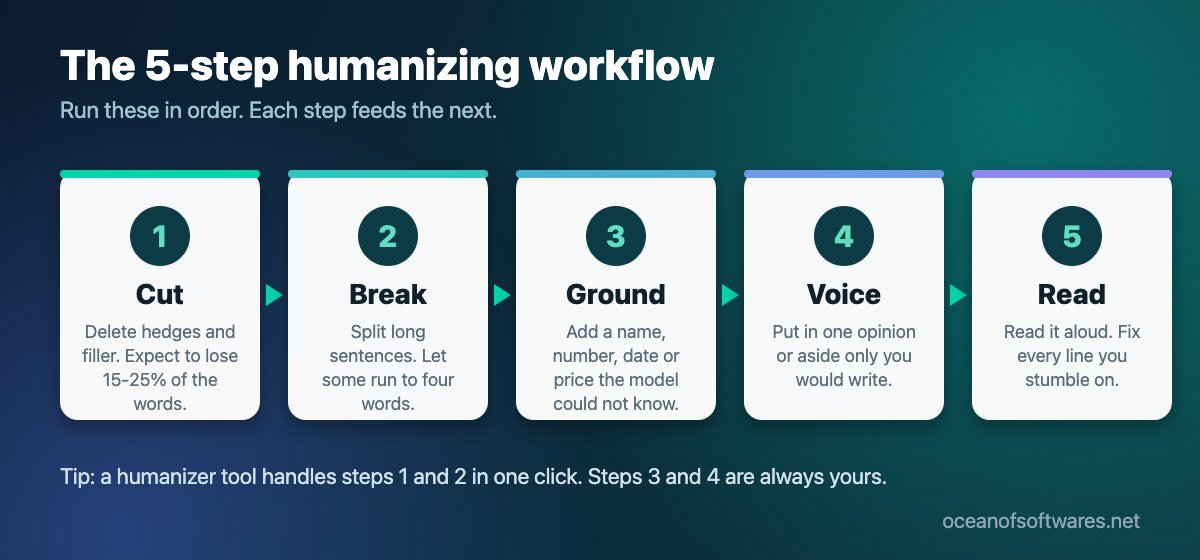
Work through these in order. The early ones make the later ones easier, because you cannot hear a rhythm problem until the filler is gone.
- Delete the hedges. Cut “it is important to note”, “can be beneficial”, “plays a vital role”, “in today’s world”. Expect a first-pass draft to lose 15 to 25% of its words with no loss of meaning.
- Vary sentence length. AI output clusters around 18 to 22 words per sentence. Break some into five words. Let one run long. The unevenness is the signal.
- Add specifics only you have. A name, a figure, a date, a price, a thing that went wrong. This is the single highest-value edit, and no tool can do it for you.
- Replace categories with examples. “Various productivity tools” becomes “Notion and a paper notebook”. Concrete nouns carry more than adjectives.
- Break the triplets. Models love lists of three. If you only have two real points, write two.
- Cut signpost openers. “Moreover”, “Furthermore”, “Additionally”, “In conclusion”. Start the sentence with its subject instead.
- Write one opinion. One line where you say what you actually think, including what you would not recommend. Balance everywhere reads as nobody.
- Fix the ending. AI conclusions restate the introduction. Replace yours with the next action, or the thing you are still unsure about.
- Read it aloud. Every place you stumble is a place a reader will too. This catches what the other eight miss.
Before and after: a worked example
Here is a typical AI paragraph and the same point rewritten. Nothing was added except specifics and a view.
| AI draft (52 words) | Humanized (41 words) |
|---|---|
| In today’s fast-paced digital landscape, it is important to note that choosing the right project management tool can be highly beneficial for teams. There are various options available, each offering unique features and capabilities that can help organisations streamline their workflows and enhance overall productivity significantly. | We tried four project tools in a year. Trello was too thin by month three. Jira was too much for six people. Notion stuck, mostly because the database view doubled as our client tracker. Pick for the second year, not the first week. |
The second version is shorter, names three products, gives a timeframe and a team size, and ends on advice the first version never reaches. Only the first sentence of each is structurally similar, and that is the point: the rewrite is not a paraphrase, it is a different piece of information.
Can AI detectors tell the difference?
Sometimes, and they are not reliable in either direction. Detectors score statistical patterns such as how predictable each word is, which means they flag plain, well-edited human writing fairly often and miss heavily edited AI text. No humanizer, including ours, can guarantee a particular detector result, and any tool that promises one is overselling.
The more useful target is the reader. Text that survives a careful read by someone who knows the subject will also tend to score better, because the things that convince a person (specific detail, consistent voice, real structure) are the things that shift the statistics. If you are submitting academic work, follow your institution’s rules on disclosing AI use rather than trying to disguise it.
Humanize AI text free, in your browser
The Free AI Text Humanizer on this site does the mechanical passes for you. It needs no account and no API key, and it runs entirely in your browser, so the text you paste is never sent to a server.
- Tone: Casual, Neutral or Professional.
- Strength: Light, Medium or Strong.
- Show changes: see exactly what was edited rather than trusting a black box.
- What changed panel: word count before and after, number of edits, a rough “robotic signals” score, and a sentence-rhythm chart.
- New variation: run it again for a different result.
- Limit: 50,000 characters (roughly 8,000 words) per rewrite.
It is rule-based, which has a trade-off worth knowing: it is fast and private, but it can shift meaning in technical, legal or medical writing. Always reread the output. And it cannot invent the specifics from fix number three, so treat it as step one of five, not the whole job.
Frequently asked questions
How do you humanize AI text for free?
Paste the draft into a browser-based humanizer such as the Free AI Text Humanizer, pick a tone and strength, then edit the result by hand to add specifics and one line of opinion. The tool pass takes seconds; the hand pass takes about 10 minutes per 1,000 words.
Does humanizing AI text remove plagiarism?
No. Plagiarism and AI detection are different problems. A humanizer rewrites phrasing, so it will not fix text that reproduces someone else’s work. Run a separate plagiarism check, and cite your sources.
Will Google penalise AI-written content?
Google does not penalise content for being AI-assisted. Its spam policies target content mass-produced mainly to manipulate rankings rather than to help readers, regardless of how it was made. Useful, original, well-edited content is fine; bulk output is the risk.
How long should humanizing take?
Budget roughly 10 to 15 minutes per 1,000 words for a careful pass. Most of that goes on adding specifics, which is the slowest and most valuable part.
What is the fastest single fix?
Delete every hedging phrase, then read the draft aloud. Those two steps alone remove most of the robotic feel.
Can I humanize AI text without a tool?
Yes. The nine fixes above are all manual edits. A tool only speeds up the cutting and sentence-splitting passes.
Final thoughts
Humanizing AI text is mostly subtraction plus one addition: cut what the model padded in, then put back the specifics it never had. A free humanizer gets you through the subtraction quickly, which leaves your time for the part that actually makes writing yours.
Start with a draft you already have: run it through the Free AI Text Humanizer, then apply fixes three and seven by hand.
Related reading